 Jambolaya
Word Search
How to play
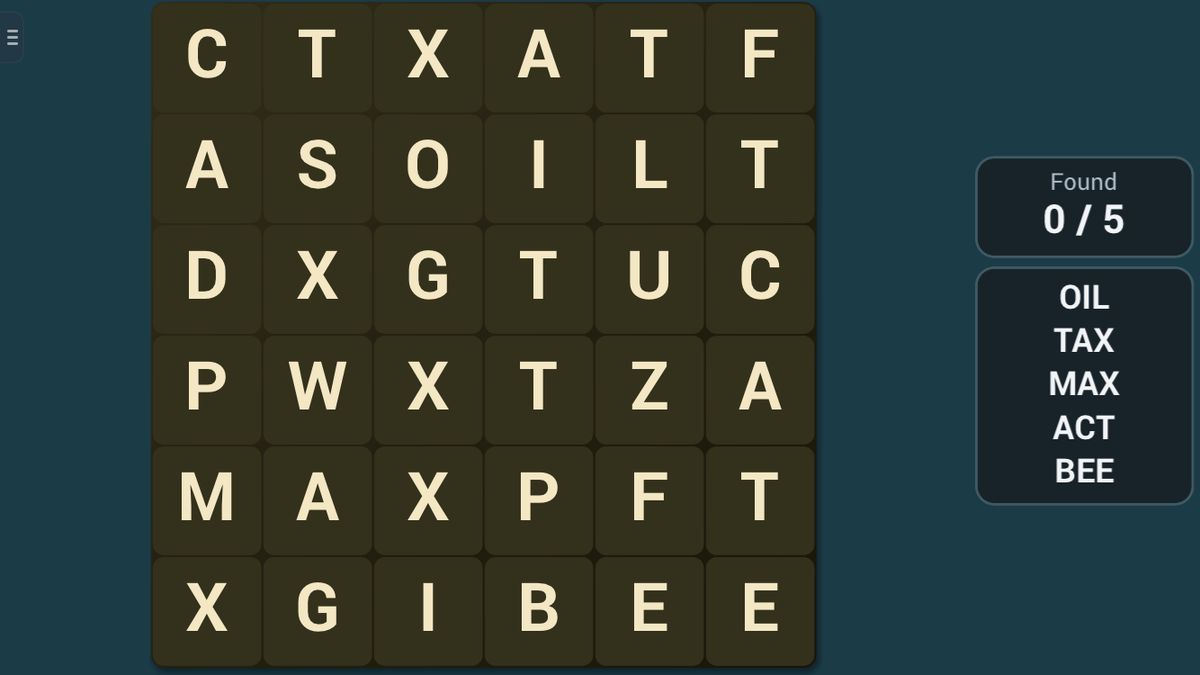
Find every hidden word in the letter grid. Words run across or down, forwards or backwards. Tap the first letter of a word, then its last letter, to mark it. Find them all to finish.
Options: with Crossing words, words share a letter where they cross; with Diagonal words, words also run diagonally.
The aim
A square grid of letters hides a handful of words. The words to find are listed beside the grid, and your aim is to find every one of them.
How to play
- Pick a word from the list.
- Hunt for it. Words run in straight lines, across or down, forwards or backwards.
- When you spot it, tap its first letter. That letter gets a gold ring.
- Then tap its last letter. If those two letters are the ends of a hidden word, the whole word turns green and is crossed off the list.
You can tap the ends in either order. To take back a ring, tap the same letter again. If your taps don't mark a hidden word, the ring simply goes away.
A small example. On Easy, the list might say CAT. You notice T, A, C side by side in the third row: CAT, written backwards. Tap the C, then the T, and the word lights up green.
Scoring and the end of the game
The game ends when every word has been found. The Difficulty setting chooses the grid and the words:
- Easy: a 6 by 6 grid with five words of 3 letters.
- Normal: 8 by 8, with six words of 4 letters.
- Hard: 10 by 10, with seven words of 5 letters.
- Very hard: 11 by 11, with eight words of 6 letters.
Two options make any level harder. With Crossing words, each word after the first crosses another, sharing a letter. With Diagonal words, words also run corner to corner.
Playing alone, you choose no timer, or the level's own time: 3 minutes on Easy, 5 on Normal, 8 on Hard, 10 on Very hard. Finish and the app shows your time; if the clock runs out, it shows how many you found.
In a race, two to six players hunt the same grid, and the player who invites picks the level and options. With Each their own board, everyone searches their own copy, and the first to find every word wins. With One shared board, everyone hunts on one grid. A word goes to whoever marks it first and turns that player's colour. When all the words are found, the most words wins; players sharing the top count draw.
Tips to play better
- Sweep one row at a time, then one column. A slow, even sweep finds more than jumping around.
- Look for the last letter too. Words can run backwards, so a word may start where you expect it to end.
- Hunt for an unusual letter. If a word has a K or a W, find those first.
- Use the words you have found. With Crossing words on, every new word passes through a letter of another word.
- On a shared board, grab the easy ones fast. Words taken by others are crossed off your list too.
Common mistakes
- Tapping the first letter, then a letter in the middle. The second tap must be the word's last letter.
- Forgetting that words run backwards, or diagonally when that option is on.
- Leaving a gold ring on a stray letter. Your next tap then measures a line from it. Tap it again to clear it.
Playing with family
Word Search is a calm game for spelling and careful looking, with no timer unless you choose one. Easy suits early readers, while Very hard keeps grown-ups busy. It plays in the app's language.
The guided lesson walks you through two words with their ends glowing, shows the list being crossed off, then explains the levels and the two options.
In the app, two to six players can play together nearby, each on their own phone or tablet, with no Wi-Fi or internet needed. One shared board makes a lively family round. The browser edition plays on a single device.
Ways to play
- On your ownPlay alone, whenever you like.
- Play together, nearbyWith family and friends in the same room: up to 6 players, each on their own phone or tablet. No Wi-Fi or internet needed. In the Jambolaya app.
- Learn by playingA guided lesson on the real game teaches you the rules one step at a time.
 Code Breaker1–2 players
 More or Less1–2 players
 Trail Trace1–2 players
 Pair Up1–4 players
 Match Dash1–2 players
 Pattern Flash1–2 players
 Number Hunt1–2 players
 Alphabet Run1–2 players