 Jambolaya
Word Builder
How to play
Hear the word — it is spoken when your device has a voice for the language; without one, it shows for a moment and then hides. Build it by tapping the letter tiles in order; two tiles are extras, one of them a look-alike.
Tap the line to hear or see the word again.
Every letter is checked as you place it: a wrong tile does not stick — the tile that belongs next is ringed and the word is said again — so the word is always built right in the end, but only a word built without a slip scores.
Twelve words: three letters, then four, then five.
The aim
In Word Builder, you hear a word, then build it from letter tiles, one letter at a time. It is spelling by ear, sound by sound. Build a word without a slip to score.
How to play
There are no turns. Before you start, choose a level and a timer: none, 1 minute or 3 minutes. No timer is the default.
- Easy: short, common words of three letters, then four, with one extra tile.
- Normal: three letters for the first four words, then four, then five, with two extra tiles. One of them looks like a letter in the word.
- Hard: less common words of five letters, then six, with three extra tiles, two of them look-alikes.
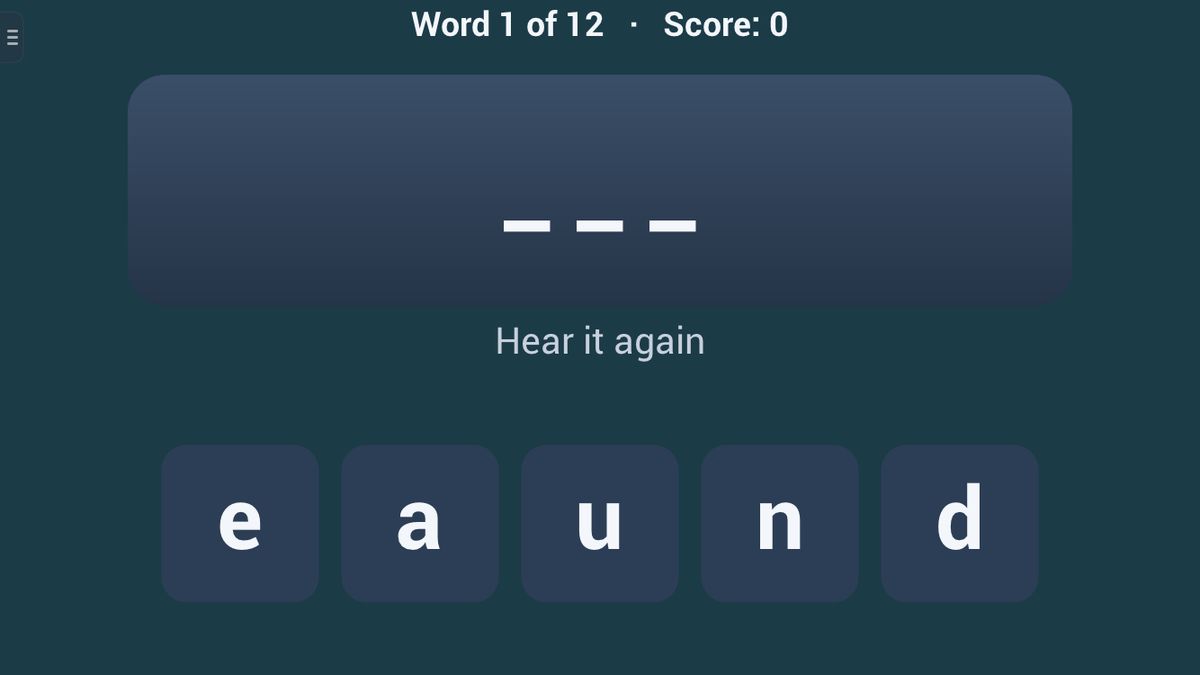
The word is spoken aloud and never shown. At the top is a line of gaps, one per letter: "_ _ _". Tap the line ("Hear it again") whenever you like.
- Tap the tile with the first letter. If it is right, the letter appears on the line and its tile goes dim.
- Then the second letter, and so on.
- A wrong tile doesn't stick. It is ringed red, the tile that belongs next is ringed green, and the word is said again. After a second, tap to carry on.
- A finished word is shown whole, ringed green, with a chime.
Every word gets built in the end, because a slip always shows you the right next tile. But only a word built with no wrong tile scores a point.
An example on Normal: you hear "dog". The tiles are g, b, o, d and s. The b is the trap, because it looks like d. You tap d, o, g, and the word scores.
The app offers Word Builder only when your phone or tablet has a voice for your language. If you switch Voice off in Settings, each word is shown for a moment instead, then hides; tapping the line shows it again briefly.
Scoring and winning
There are twelve words. Your score is the number built without a slip, shown at the top beside the word you are on.
Alone with no timer, you build all twelve, and the app shows how many seconds you took. With a timer, if the clock runs out first, it shows your score so far.
In a race, both players get the same words, in the inviter's language and at the inviter's level, and both devices need a voice for that language. You can see your rival's score. The first to finish all twelve wins the race. If you finish moments apart, the faster time wins; exactly the same time is a draw.
Tips to play better
- Say the word slowly in your head, sound by sound: "d… o… g." Each sound points to a letter.
- Find all the letters first, then tap them in order.
- Watch the look-alikes. If you see both b and d, or p and q, stop and think which one the word needs.
- Expect a stray. Not every tile belongs in the word.
Common mistakes
- Tapping the first likely tile. A look-alike is there to catch you.
- Relaxing after the first letter. One wrong tile anywhere in the word, and it can't score.
Playing with family
Word Builder is a gentle way for children to practise spelling, and for anyone who mixes up letters. Easy is a good start. In Settings, the Reading section can make the letters bigger, space them wider, or switch to an easier-to-read font.
The guided lesson plays the word, shows how to hear it again, rings the first letter, lets you place the rest, and explains what a wrong tile does.
There is no computer opponent. Play alone, or, in the app, race another player together nearby, each on your own phone or tablet, with no Wi-Fi or internet needed. The browser edition is for one device.
Ways to play
- On your ownPlay alone, whenever you like.
- Play together, nearbyOne-on-one with someone in the same room, each on your own phone or tablet. No Wi-Fi or internet needed. In the Jambolaya app.
- Learn by playingA guided lesson on the real game teaches you the rules one step at a time.
 Odd One Out1–6 players
 Quick Tap1–2 players
 Perfect Ten1–2 players
 Echo Chain1–2 players
 What Changed?1–2 players
 Color Clash1–2 players
 Shopping List1–2 players
 Math Sprint1–2 players